GarMini UI
Freev1.0.0
Amazfit Active 3 Premium · v1.0.0 · 0.0 MB
Screenshots

Description
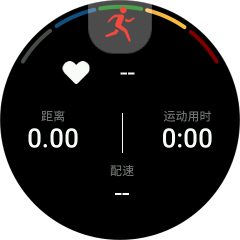
* After downloading the app, please go to the Workout List > Select Exercise > Settings > More > Data Page > Add Page > App/Workout Data to add usage. GarMini UI provides data on Heartrate(including five stage to show in arc), Distance, Workout duration, and Pace, and is displayed using traditional UI design. Whether you are a seasoned sports enthusiast or someone who is just starting to pay attention to a healthy lifestyle, GarMini UI can provide you with an intuitive and efficient sports data tracking experience.
Supported Devices
This app is built per screen — pick your watch for the right download and its screenshots.
 Active 3 Premiumv1.0.0
 T-Rex Ultra
2v1.0.0
 Active
Maxv1.0.0
 T-Rex 3 Pro (44mm)v1.0.0
 T-Rex 3 Pro (48mm)v1.0.0
 Active 2 (Square)v1.0.0
 Bip 6v1.0.0
 Balance
2v1.0.0
 Active 2 (Round)v1.0.0
 T-Rex
T-Rex3v1.0.0
 Balancev1.0.0
 Active
Edgev1.0.0
 Cheetah (Square)v1.0.0
 Cheetah (Round)v1.0.0
 Cheetah
Prov1.0.0
 GTS 4v1.0.0
 T-Rex
T-RexUltrav1.0.0
 GTR 3
GTR 3Prov1.0.0
 T-Rex
T-Rex2v1.0.0
 Falconv1.0.0
 GTR 3v1.0.0
 GTS 3v1.0.0